

.png)

QuickBooks for Nonprofits: Guide & Comparison

QuickBooks is one of the most widely used accounting platforms globally, and many nonprofit finance teams and CPAs naturally consider it when evaluating accounting software. With Intuit marketing versions like QuickBooks Premier Nonprofit and QuickBooks Online, it seems like a logical choice.
However, there's a question growing nonprofits should ask before committing: Is software built for general business use actually robust enough for complex nonprofit financial management?
Nonprofit accounting has distinct requirements. Fund accounting, tracking restricted vs. unrestricted funds, grant reporting, and donor accountability are legal and ethical obligations that directly impact your organization's compliance, board confidence, and donor trust.
This guide examines how QuickBooks serves nonprofit organizations, explores its features and pricing, discusses common limitations, and explains why purpose-built nonprofit accounting software like Aplos delivers better outcomes for growing organizations.
What Makes Nonprofit Accounting Different?
The commercial world measures success by profit. The basic equation is simple: Revenue - Expenses = Net Income. A business with $10,000 in the bank can allocate that money to rent, inventory, or payroll at its discretion.
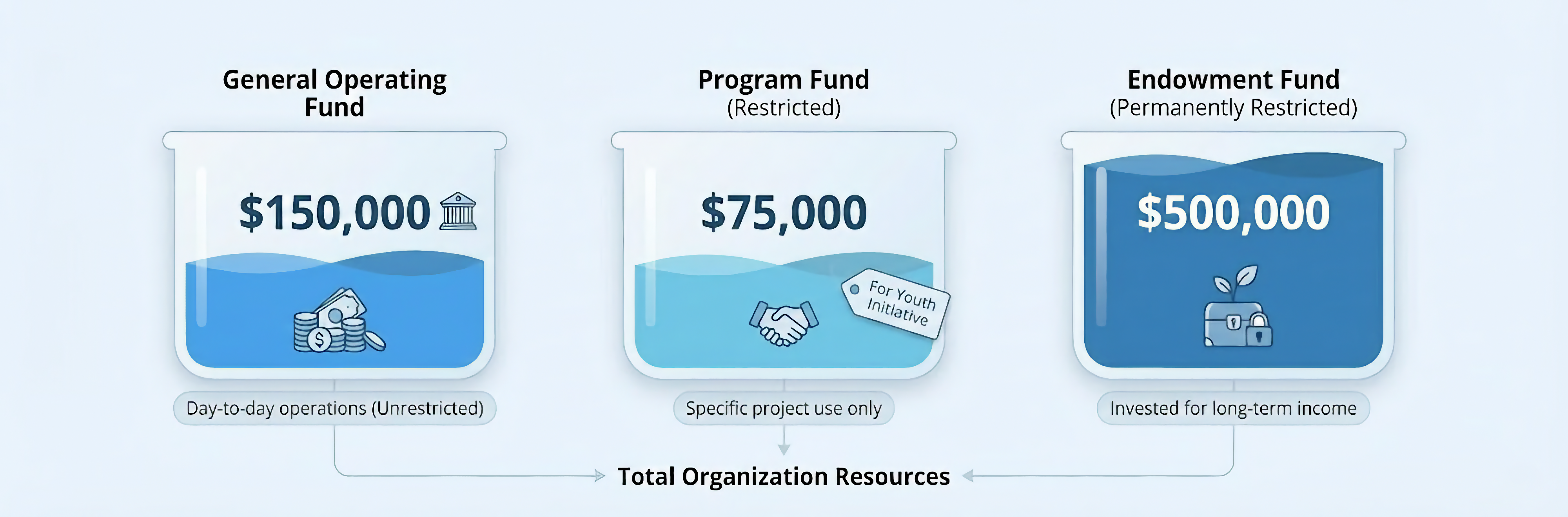
Nonprofits work differently. That same $10,000 in a nonprofit's bank account might consist of $2,000 in the General Fund (unrestricted, available for operating expenses), $5,000 in the Building Fund (restricted for capital expenses), and $3,000 in the Scholarship Fund (restricted for student aid).
This is fund accounting. When donors specify how their contributions must be used (whether for a building campaign, a specific program, or disaster relief), nonprofits have a legal and ethical obligation to track those dollars separately and use them only for their intended purpose. Failing to do so breaches donor trust and can violate IRS regulations and state law.
QuickBooks for Nonprofits: Features and Capabilities
Does QuickBooks Have a Nonprofit Version?
QuickBooks offers QuickBooks Desktop Premier Nonprofit Edition and QuickBooks Enterprise Nonprofit, which are versions of their desktop software configured with a nonprofit chart of accounts and specialized reports. QuickBooks Online doesn't have a separate "nonprofit edition." Nonprofits use the standard QBO Plus or Advanced plans and must customize them.
Fund Accounting (Sort Of)
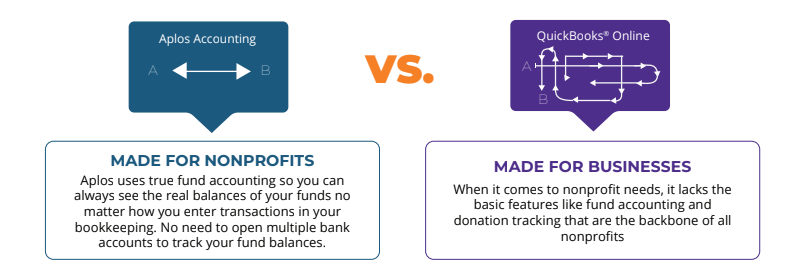
QuickBooks wasn't designed for fund accounting from the ground up. It can be configured to simulate fund accounting using a feature called "Classes."
You create a Class for each fund or program (like "General Fund," "Building Fund," "Missions"), tag every transaction with the appropriate Class, and run reports like "Profit & Loss by Class" to see fund-specific activity. This workaround allows basic fund segregation, but comes with significant limitations.
QuickBooks Online's Balance Sheet by Class has limitations as well. Header accounts like bank balances and accounts receivable won't properly sort by class, making true fund-level balance sheets difficult to produce. These header accounts show as "Not Specified" rather than being allocated to specific classes or funds.
Without proper fund-level balance sheets, you might know you spent $5,000 from the Building Fund this year, but determining the Building Fund's true remaining balance (including bank accounts and receivables) requires manual reconciliation and workarounds.
A common workaround? Opening multiple bank accounts, one for each fund, to manually track balances. Not just line items on the Balance Sheet, but entirely separate accounts at the bank. This creates administrative overhead and complexity.
Intuit's documentation acknowledges that Balance Sheet by Class reports can show "unclassified amounts" and requires careful setup to interpret correctly.
Donations and Basic Donor Tracking
QuickBooks allows you to record donations and link each gift to a specific donor using the Customer/Donor list. You can record donor gifts via sales receipts or invoices, assign donations to specific funds using Classes, set up recurring donations, track donor transaction histories, and generate basic donor contribution reports.
QuickBooks does not include a full donor CRM (Customer Relationship Management) system. It lacks donor contact management and engagement tracking, fundraising analytics and campaign management, automated thank-you letters and acknowledgments, donor retention and lapse analysis, and native integration with online giving platforms.
For robust donor management, you'll need to integrate QuickBooks with dedicated CRM systems requiring their own subscription and creating potential data sync issues.
Nonprofit Reporting
QuickBooks has a powerful and flexible reporting engine. The system includes standard business reports that can be adapted for nonprofit use: Statement of Financial Position (similar to a Balance Sheet), Statement of Activities (similar to a Profit & Loss), and Budget vs. Actual reports by class.
QuickBooks Online does not include a native Statement of Functional Expenses report. Reports filtered by fund (using Classes) are possible, but donor-level and grant-level reporting requires workarounds since QuickBooks lacks native donor CRM or grant-tracking features.
You can customize report formats and schedule memorized reports to email automatically, though nonprofit-specific reports often require manual adjustments before scheduling. Producing FASB-compliant reports with proper net asset classification and donor restriction tracking typically requires significant manual setup, custom report building, and often exporting data to Excel for final formatting and compliance adjustments.
QuickBooks Pricing for Nonprofits
Retail Pricing:
- QuickBooks Online Simple Start: ~$38/month (1 user, basic features)
- QuickBooks Online Essentials: ~$75/month (3 users, bill management)
- QuickBooks Online Plus: ~$115/month (5 users, includes Class tracking)
- QuickBooks Online Advanced: ~$275/month (25 users, advanced features)
The Hidden Costs:
You'll likely need additional subscriptions to achieve full nonprofit functionality:
- Donor management CRM
- Online giving platform
- Advanced payroll
- Grant tracking tools
Depending on your needs, your total cost of ownership may exceed $200-400/month when factoring in these additional tools. Most nonprofits don't add these up until they're already paying them.
Your QuickBooks® bill is hiding more than it shows.
The retail price above is only the line you can see. Add the donor CRM, the online giving platform, the grant tracker, the consultant hours, and the staff time lost to workarounds, and the real number gets uncomfortable fast. Plug your numbers in and see what your nonprofit is actually spending to stay on QuickBooks®. Calculate your true cost →
Integration Ecosystem
QuickBooks Online has an extensive app marketplace with thousands of integrations. You can connect fundraising platforms, donor CRM systems, payroll providers, bank accounts, payment processors, and time tracking tools. This flexibility is powerful if you have the IT capacity to manage multiple systems. It also introduces complexity through data sync issues, managing different logins, and troubleshooting integration problems that consume significant staff time.
The Limitations of QuickBooks for Nonprofits
Growing nonprofits frequently encounter these critical challenges with QuickBooks:
1. Not True Fund Accounting
Without automated fund balance enforcement, nonprofits risk accidentally spending restricted funds on unintended purposes. This requires strong internal controls and regular reconciliation to catch errors before they become compliance issues during audits or board reviews.
2. The Board Reporting Gap
Nonprofit boards need Budget vs. Actuals broken down by program or grant, fund balances showing restricted vs. unrestricted amounts, functional expense allocations (Program, Administration, Fundraising), and grant expenditure reports.
Generating board-ready reports in QuickBooks often involves exporting data to Excel, manually formatting columns, creating pivot tables, merging multiple spreadsheets, and double-checking calculations. This process consumes hours before every board meeting and introduces the risk of errors.
3. Form 990 Preparation Challenges
The IRS Form 990 is the primary tax document for nonprofits, and it requires specific categorizations that don't map neatly to standard business accounting categories.
QuickBooks users must manually map general ledger accounts to Form 990 categories, calculate functional expense allocations separately, and export data to manually populate the form (or pay a CPA thousands of dollars to do it).
Nonprofit-specific software can generate Form 990-ready reports automatically because the chart of accounts is designed around IRS requirements.
4. The Spreadsheet Multiplication Effect
Many nonprofits using QuickBooks find themselves maintaining extensive Excel spreadsheets alongside their accounting software to track grant budgets and expenditures, multi-year budgets, program-level metrics, fund balance calculations, and donor giving patterns.
This is often described as "death by a thousand spreadsheets." You're paying for accounting software but still doing critical tracking in Excel because QuickBooks can't handle it natively.
5. Scaling Problems
Many nonprofits start with QuickBooks when operations are straightforward. As they grow and take on more complex funding structures, they hit walls. Managing 20+ funds becomes unwieldy with Classes. Multiple grants require separate tracking that Classes can't provide.
Staff need access but per-user costs add up. Year-end closing becomes increasingly complex. The "workarounds" require accounting expertise that many finance teams don't have.
Many nonprofits find themselves outgrowing QuickBooks after building years of financial history in a system that wasn't designed for nonprofit-specific needs, making migration more complex than if they'd started with purpose-built software.
Purpose-Built Nonprofit Software
If you're experiencing the limitations of QuickBooks or want to avoid them as your organization scales, purpose-built nonprofit accounting software addresses these challenges.
Aplos: Built for Nonprofit Financial Management
Aplos is frequently cited as a leading alternative to QuickBooks for nonprofits. It's now part of the Velora nonprofit technology suite, which includes Aplos for accounting, Keela for donor CRM, and Raisely for online fundraising.
True Fund Accounting
Aplos was built from the ground up on fund accounting principles. Every fund is treated as its own entity with self-balancing accounts.
When you receive a donation, you assign it to a specific fund immediately. The system tracks that fund balance across all transactions automatically. You can produce a Statement of Financial Position by Fund automatically. Year-end closing is streamlined with built-in period close functionality.
"The fund accounting is perfect for tracking restricted donations," notes one verified Aplos user. Another adds, "Before Aplos I was running several programs just to do the essentials. Aplos has given us one program to complete most tasks."
"We switched from QuickBooks to Aplos nearly three years ago, and we've never regretted the switch for one second." - Kevin L., Finance Director
Advanced Donor Management with Keela
Aplos handles the accounting side of donations: tracking every gift by donor, fund, and campaign, and generating automated donor receipts and year-end giving statements. For advanced donor relationship management, Keela (part of the Velora suite) provides the robust CRM capabilities that QuickBooks lacks entirely.
Keela delivers predictive analytics and smart ask amounts, donor retention and lapse risk identification, advanced donor segmentation, and comprehensive email marketing and donor communications.
Track donations by donor, campaign, and fund. Generate automated donor receipts and year-end giving statements. Build email campaigns with drag-and-drop builders. Provide donors with a self-service portal to view their giving history.
The integration between Aplos and Keela through Velora means when a donation comes in online, it's immediately reflected in both the accounting system and the donor's record.
Online Giving Integration
Through the Velora ecosystem (Aplos + Raisely), you get beautiful, customizable donation pages, peer-to-peer fundraising campaigns, event ticketing and registration, and automatic accounting sync where every online donation flows directly into your proper accounts and funds.
When a supporter makes a gift through Raisely, the transaction data flows automatically into Aplos.
Board-Ready Reporting
Aplos includes pre-built reporting templates for your most common nonprofit financial statements. This includes the Income Statement, Balance Sheet, Cash Flow Statement, and Budget to Actual. These reports can be filtered by fund for even greater nonprofit-specific clarity. All formatted professionally and ready for your board packet. Form 990 reporting tools are available as an add-on.
Designed for Finance Teams
Aplos uses nonprofit-native language. "Donations" instead of "Revenue." "Funds" instead of "Classes." "Check Register" instead of "General Journal."
The setup wizard guides you through creating your chart of accounts and funds in minutes. Most organizations are up and running in days, not months. This allows your finance team to manage accounting confidently without requiring a CPA on staff.
Transparent, Predictable Pricing
Aplos pricing is straightforward: see why nonprofits are switching from QuickBooks to Aplos:
- Lite Plan: ~$79/month (Fund accounting, donations, 2 users)
- Core Plan: ~$129/month (Adds AP/AR, budgeting, integrations)
- Advanced Plan: ~$229/month (Multi-dimensional reporting, fixed assets)
Everything you need is included in one price.
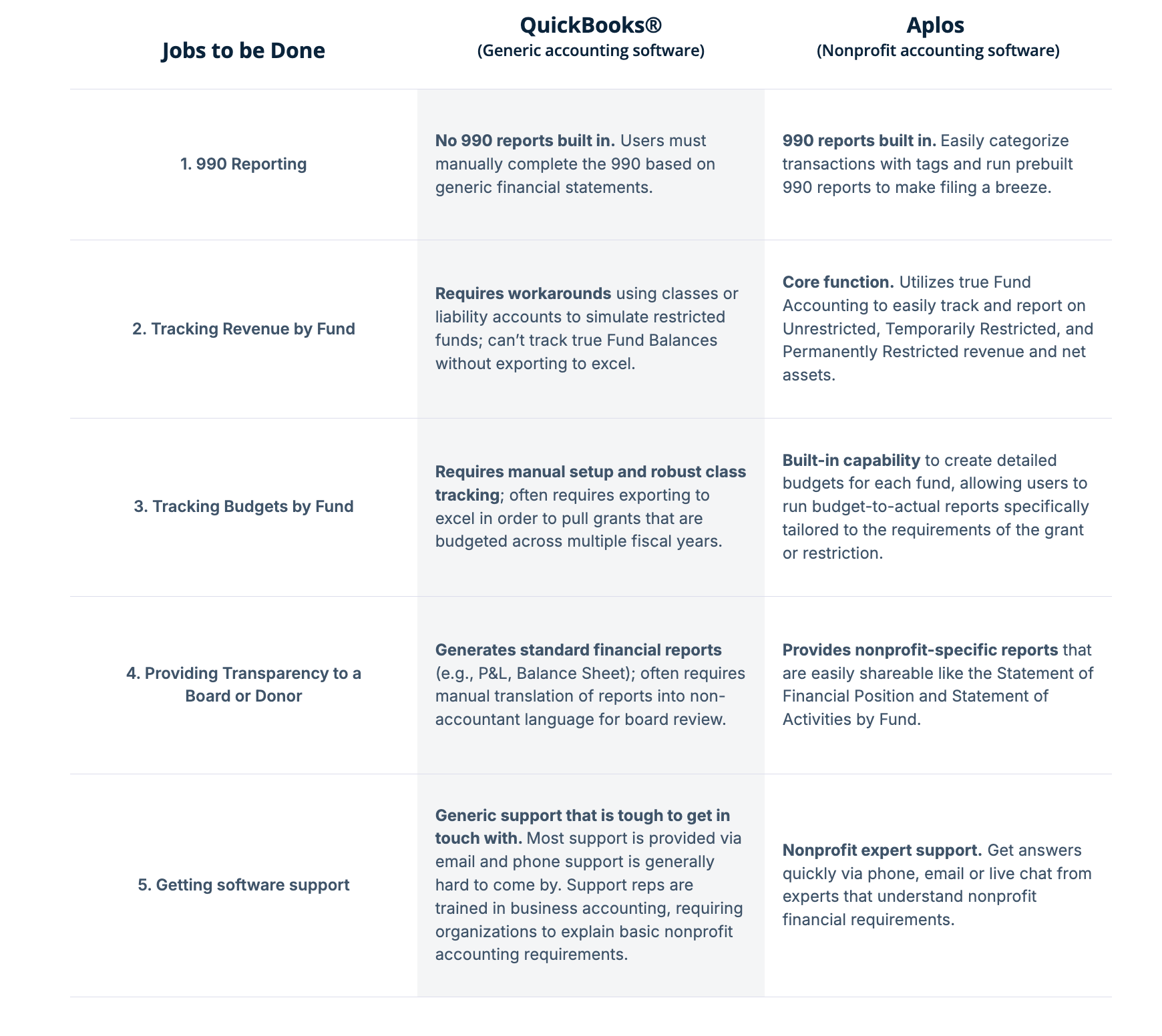
Feature Comparison: QuickBooks vs. Aplos
Customer Success Story:
City of Leon, Kansas:
When the City of Leon hired an auditing CPA to perform a routine audit, she quickly encountered problems. The city had been using QuickBooks, which wasn't optimized for fund accounting, making cash balances for funds difficult to determine. Bank accounts hadn't been reconciled for two years.
The auditor referred the City of Leon to Aplos for both software and bookkeeping services. Aplos migrated all QuickBooks data, built a new chart of accounts based on the city's reporting needs, completed two years of bank reconciliations, and worked directly with the city to properly allocate transactions to the correct funds.
The switch to true fund accounting software gave the City of Leon accurate fund balances, proper financial controls, and a system they could understand and maintain going forward.
How to Migrate from QuickBooks to Aplos
Choose to complete the onboarding process yourself, or leave it to our team of experts to help get you up and running.
1. Export Data from QuickBooks
Export your Chart of Accounts, Bank Reconciliation Reports, Contacts (Donors/Vendors), and run a Trial Balance Report for your cut-off date from QuickBooks.
2. Define Funds and Map Destination
Map your QuickBooks Accounts and Classes to your new Aplos Accounts and Funds or Tags.
3. Import Data to Aplos
Use the Aplos import tool to upload your Contacts. For your Chart of Accounts, you can contact Aplos Support to have it imported, create it manually, or if you purchase onboarding services, Chart of Accounts setup is included. Then set up your new Funds.
4. Import and Configure Data
Use the Trial Balance Report from Step 1 to enter the correct starting balance for every account in Aplos via a single journal entry.
5. Reconcile, Review and Go Live
Enter any outstanding transactions per your Bank Reconciliation reports, as well as any outstanding (unpaid) Invoices or Bills. Run and compare reports in Aplos with reports in QuickBooks.
Making the Right Choice for Your Nonprofit
QuickBooks is a powerful, well-established accounting platform used by millions of organizations. For some nonprofits (particularly those with simple finances, limited restricted funds, and accounting expertise), it can work.
As your nonprofit grows and takes on more complex funding structures, the limitations become more apparent. Fund accounting errors that violate donor restrictions. Audit findings and compliance issues. Countless hours spent on workarounds and manual processes. Data scattered across multiple disconnected systems. Difficulty producing board-ready reports.
Aplos was created specifically to solve these problems. As part of the Velora nonprofit technology suite, Aplos combines true fund accounting with integrated donor management (through Keela) and online fundraising (through Raisely). Your nonprofit gets confidence that your books are accurate and compliant, time back to focus on your mission instead of reconciling spreadsheets, transparency that builds trust with donors and board members, and a system that scales with you instead of one you'll outgrow.
Whether you're just starting out or looking to upgrade from a system that's no longer serving your needs, choosing the right accounting software is one of the most important operational decisions you'll make.
Ready to see the difference? Try Aplos free for 15 days and experience what true nonprofit accounting software can do for your organization.
.png)
Frequently Asked Questions
Is QuickBooks Online good for nonprofits?
It depends on your organization's size and complexity. Many small nonprofits choose QuickBooks Online because it's a lower-cost, familiar starting point. It's cloud-based, reliable, and widely used by bookkeepers. QBO supports fund tracking through Classes and Locations, though this is a workaround rather than native fund accounting architecture. Budgeting is limited to annual budgets by class, multi-year budgets and grant-specific budget tracking typically require external tools or manual spreadsheets. Donor management and fundraising capabilities require integrations with third-party CRM and online giving platforms, as QBO doesn't include these features natively.
What's the difference between QuickBooks and nonprofit accounting software?
QuickBooks is general-purpose software made for for-profit businesses with add-ons for various industries. Nonprofit accounting software is purpose-built for the unique needs of 501(c)(3) organizations. Nonprofit software has true fund accounting that maintains separate fund balances and enforces restrictions automatically, predefined reports for FASB standards and Form 990, integrated or native donor management and fundraising capabilities, terminology that matches nonprofit operations (donors, funds, donations, grants), and multi-dimensional tracking (fund, project, donor, grant simultaneously). QuickBooks can be adapted for nonprofit use, but it requires more work, expertise, and often external tools.
How much does QuickBooks cost for nonprofits?
QuickBooks Online pricing ranges from $38-275/month depending on the plan. However, you'll likely need additional subscriptions to achieve full nonprofit functionality. Aplos starts at $79/month for fund accounting. Add Keela for donor CRM and Raisely for online giving through the integrated Velora suite.
Can nonprofits use regular QuickBooks?
Yes, but with limitations. Nonprofits can use standard QuickBooks Online (there's no separate "nonprofit edition" for QBO). You'll need to set up a nonprofit chart of accounts, use Classes to track funds, customize reports for nonprofit financial statements, and integrate with third-party tools for donor management. The QuickBooks Desktop Premier Nonprofit Edition comes pre-configured for nonprofits, but Intuit has discontinued new sales of Pro, Premier, and Mac desktop versions. QuickBooks Enterprise editions remain available for purchase, though at a significantly higher price point than the discontinued versions. Most nonprofits now choose between QuickBooks Online (with significant customization) or purpose-built nonprofit software like Aplos.
Why might a nonprofit choose Aplos over QuickBooks?
Nonprofits switch to Aplos (or choose it from the start) for several reasons. True fund accounting reduces errors and ensures FASB compliance automatically. Automation saves significant time on financial management tasks. The software is built to handle growing organizations with multiple funds, programs, and grants. Being part of the Velora suite (Aplos + Keela + Raisely) eliminates data silos. Unlimited support from nonprofit accounting specialists is included in the subscription.

.png)
Make your accounting work for your mission today
Start your 15-day trial today. No credit card required.